Advanced Saved Search
An Advanced Search allows the user to create an Active Filter based on a repository’s attribute value, the state of its records, a linked repository’s attribute values, or the repository’s owner.
To perform an Advanced Search on a repository:
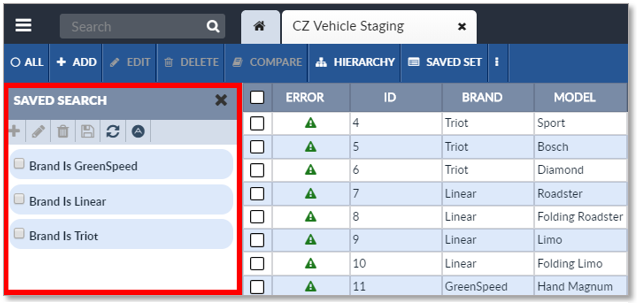
- Open the repository’s Saved Search Sidebar, (see Open the Saved Search Sidebar).
|
Saved Search Sidebar |
-
Click the
 Advanced Search button on the Saved Search Sidebar’s Activity Bar.

The Advanced Search Button
-
The Advanced Search window will appear.
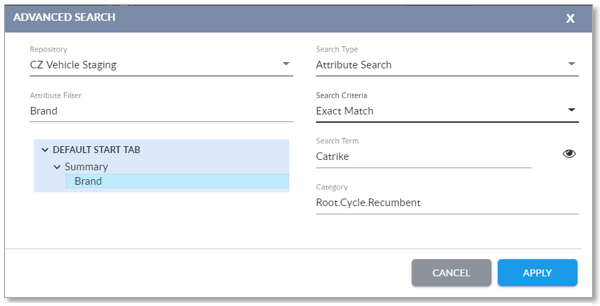
The Advanced Save Search Window
- Edit the Advanced Search options as desired:
- Repository: Select the repository the Advanced Search will be applied to. This allows the search of a linked repository if the linked repository has been configured to allow it to be searched.
- Search Type: The type of search:
- Attribute Search : Filter on the values of a repository’s attributes.
- State Search : Filter on the state of repository records.
- Owner Search : Filter on the owners.
- Link Search :
- To filter on the values of a linked repository’s attributes, select Attribute Search, then select Link Search .
- To filter on the state of a linked repository’s records, select State Search, then select Link Search.
- Select Attribute: The repository attribute or record state to filter by. The contents of the Select Attribute dropdown list vary depending on the selected Search Type.
- Search Criteria: Varies depending on the type of the attribute indicated in Select Attribute.
- Search Term: Either enter text to search for or if the Search Type is Attribute Search, click the Eye icon
to get a list of attribute values to select from.
- Category: Appears if the Search Type is Attribute Search. If a Taxonomy node is selected from the dropdown Taxonomy Node Tree for the repository, only attribute records assigned to that node will be searched.
- To apply the Advanced Search, click the Apply button. To exit the Advanced Search window without applying the Advanced Search, click the Close button.

Copyright 2007, 2023 Precisely