Attributes
An attribute is a piece of data in the record that describes an item. For
instance, if a repository held contact information for a group of people,
each record would describe one person and the attributes would be Address,
Phone, and Zip.
 Attribute Data Types
Every record attribute has a data type. The data type specifies what type of data will be stored in that field and how the attribute’s value should be interpreted. An attribute’s data type is established when EnterWorks is configured. Some data types have configurable characteristics. For instance, if an attribute is declared as VARCHAR data type, the maximum length of the attribute’s character string must also be specified.
When the editor displays an attribute value for the user to edit, the format it uses is defined by the attribute’s data type, as is the format of the value the user will enter. For instance, an attribute of the type DATE might display a calendar for the user to select from as well as a place for the user to type the date in directly, whereas an attribute of the type CURRENCY may display a value in the form of “$xxx.xx”.
When a user edits a record and saves it, the editor will assign validation errors to any attribute values that do not match the attribute’s data type, such as characters entered into decimal fields.
Default Values
A record attribute may be configured to have a default value. When a new record is added, any attribute that has a specified default value will be set to the default value. Depending on the way the attribute was defined, the user or the system may be allowed to change the value.
Attribute Tabs and Groups
Records may have thousands of attributes, which can make them unwieldy to view or edit. For display purposes, attributes are grouped, typically according to their function. For instance, all the metric measurement attributes might be placed into a group called “Metric Measurements” and the imperial measurements in a group called “Imperial Measurements”.
These attribute groups are then placed into larger groups called attribute tabs. The groups Metric Measurements and Imperial Measurements might be placed into a tab named “Specifications”.
When a record is opened in an editor, the attribute tabs are displayed. The tabs can be expanded to show the attribute groups. The attribute groups can be expanded to show the actual attributes themselves.
Each repository has its own set of attribute tabs and groups. Attribute tabs and groups are defined and maintained by the system administrator.
Summary Attributes
When a record is opened in an editor, attributes selected as summary attributes are displayed in the record header. Any attributes may be selected to be summary attributes, even attributes in records that are linked to the repository.
Code Sets
A code set is a special data type that consists of a list of predefined value pairs, “Code” and “Description”, that contain all possible values for the attribute. When the attribute is displayed for editing by the user, the user will be presented with the list of paired values to choose from. If the Code and Description values are the same, only the Code will be displayed. If the Code and Description are different, they will be displayed as “<Code Value> -- <Description Value>”.
|
Code |
Description |
|---|---|
|
ARG |
Argentina |
|
DEU |
Germany |
|
IND |
India |
|
USA |
USA |
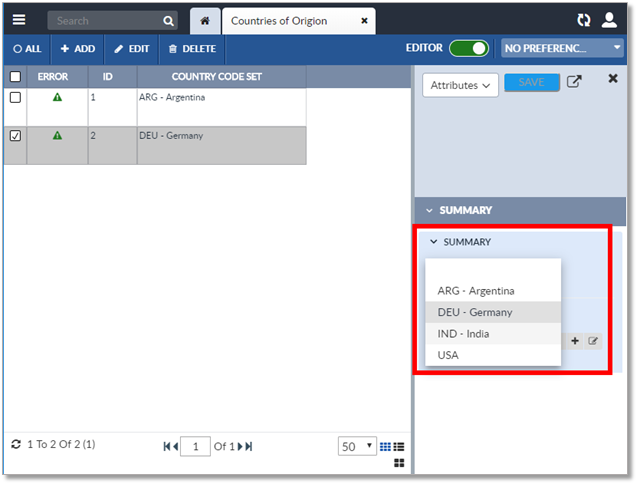
The image below demonstrates how the user would select a value for a code set when using the Inline Editor.
 Category Attributes
Each record in a repository has the same structure – the same attributes, with the same data types, in the same order. However, each record may not use all the attributes. If a business sells multiple types of items, their product repository profile must include attributes for every type of item. For instance, to store data about pens, the record would need to include attributes relative to pens, such as the type of ink they use. But if the company also sold paper, the record would also have to include attributes that describe paper, such as paper thickness. Therefore, every record in the product repository must include attributes for both pens and paper: type of ink and paper thickness. Records that contain data about pens would leave the data fields for paper thickness empty. Records that contain data about paper would leave the data field for type of ink empty.
Because a business can sell thousands of products, product records can have thousands of attributes. While this is not a problem for computers, it can be a problem for computer users. Most users don’t want to wade through thousands of empty attributes to find the ones they are interested in. They only want to see the attributes that apply to the product record they are accessing.
EnterWorks can be configured to define these relevant attributes as category attributes (also known as category specific attributes). Category attributes are assigned to a taxonomy node, which indicates to EnterWorks that all the records attached to that node use that attribute. The taxonomy attribute is the control attribute for category attributes. Depending on system configuration, descendent taxonomy nodes (a node’s subcategory nodes or children nodes) can inherit category attributes as well. Note that category attribute values are not shared – each record still maintains its own attribute value. The only effect of designating an attribute as a category attribute is to indicate to EnterWorks which attributes are relevant for a particular record.
Once category attributes have been defined and assigned to nodes in the taxonomy, and product records have also been assigned to the taxonomy, viewing or editing a record in that repository will only show the assigned category attributes.
WARNING : Be careful if you change the assignment of a category attribute to a node. Any time a category attribute is unassigned from a node, the values of that attribute will be deleted in all the records assigned to that node and in any children nodes that had inherited that attribute.
Also be careful if you change the taxonomy assignment of a record. If the new taxonomy node does not have the same category attributes as the old node, when the record is reassigned, the values of the old taxonomy node’s category attributes will be deleted from the record.
Dynamic Attributes
Dynamic attributes are similar to category attributes, but they can be assigned to a control attribute that is not the taxonomy. The control attribute for category attributes is the taxonomy attribute and only the taxonomy attribute, so a repository can only contain one set of category attributes. Since dynamic attributes are assigned to other attributes, a repository can have more than one set of dynamic attributes. If the control attribute for a set of dynamic attributes is a hierarchy attribute, dynamic attribute values can be inherited.
Calculated Fields
A calculated field is an attribute whose value is determined by the values of other attributes or system variables. For instance, the value of the attribute “Area of Rug” might be calculated by multiplying the value of the attribute “Rug Length” by the value of the attribute “Rug Width”.
The values of calculated fields are not determined until the record is saved, both in the case of a new record being added and when an existing record is being edited. If a user edits a value in a calculated field, depending upon system configuration it may be overwritten with the system-derived value when the record is saved.
Editor Control Settings
Editor controls add additional specifications on how an attribute value is displayed and the format the user will use to enter that value. These specifications are not determined by the attribute’s data type, but by how the attribute value will be used. For instance, although an attribute that holds a phone number might have the data type of VARCHAR and a length of 10, an editor control rule for that attribute may denote that the editor will display the phone number as “(xxx) xxx-xxxx” and that as the user types in digits, they will be composed in the format.
Primary Keys and Sequence Numbers
Each record in a repository has a unique record ID attribute called a key. The record’s unique, identifying key is called its primary key. Primary keys are often auto-generated.
If the primary key is an auto-sequenced attribute field and EnterWorks has been configured to allow the user to set its value, if the user enters a value, it will be saved. If the user has not, EnterWorks will generate the field value based upon the next number in the sequence and any configured rules. Once the new record is saved, the value of the auto-sequenced field is typically configured so that it cannot be changed. EnterWorks can be configured to generate unique identifiers across a set of repositories, so no duplicate identifiers will be generated or saved.
If the record’s primary key is not auto-generated and the user does not enter a primary key, the field will be left empty and an error for the record will be generated. If the user enters a value in a primary key attribute that has been used elsewhere in the repository, a duplicate identifier error for the record will be generated. EnterWorks may also be configured to ensure that within a set of repositories, no duplicate identifiers are generated or saved.
NOTE: A record’s primary key may be edited using the Attribute Value Editor in a Repository View if the user has sufficient permissions. This should not be considered common practice and great care must be taken when modifying a primary key, as the key can be referenced in numerous database tables and reports. Changing a primary key that is referenced by other repository records will effectively break the link from those records, unless the same change is made to those records as well.
A record’s primary key is not to be confused with its sequence number. A sequence number only describes the order in which records are displayed in a Repository View, it is not used to identify the record.
Repository Sequences
Each record in a repository needs a unique ID to identify it. These IDs are tracked via a sequence object (also called a sequence or sequence definition), which keeps track of the IDs that have been used in that repository.
A sequence can be shared by multiple repositories, which would guarantee that each record has a unique id across all the repositories using that sequence. A use for this would be if products were being entered in multiple repositories but each product needed a unique product ID. Although a sequence definition can be shared by multiple repositories, it is recommended as best practice to create a separate sequence definition for each repository.
The default sequence object is commonly used if the user doesn’t care what the sequence numbers are as long as they uniquely identify each record.
Association Groups
An association group is a set of attributes that coordinate with each other, in that each attribute field consists of a list of values, where the first value in the list of one attribute relates to the first value in the list of the other attributes in the association group.
For example, the association group could have the attributes “Country”, “Tariff”, “Currency”, and “Measurement”. The attribute values for a record might be:
Country = Argentina | Germany | India | United States
Tariff = 0.02 | 0.04 | 0.06 | 0.08
Currency = peso | euro | rupee | dollar
Measurement = metric | metric | metric | USCS
Where for the Country “Argentina”, the Tariff is “0.02”, Currency is “peso”, and the Measurement system is “metric”.
Another way to visualize a record’s associated attributes would to envision the record having a sub-table, such as shown below.
|
Country |
Tariff |
Currency |
Measurement |
|---|---|---|---|
|
Argentina |
2% |
peso |
metric |
|
Germany |
4% |
euro |
metric |
|
India |
6% |
rupee |
metric |
|
United States |
8% |
dollar |
USCS |
Association groups can be used by more than one profile.
Association Objects
An association object is used to assign category attributes to the taxonomy and to assign dynamic attributes to a specific control attribute. It is a list of control attribute values and their assigned category/dynamic attributes. There is one [control-attribute-value | category/dynamic-attribute] pair for each attribute assigned to a control attribute. In the case of category attributes (which are controlled by the taxonomy) and dynamic attributes that are controlled by a hierarchy attribute, the association object also indicates if an attribute for a node can be inherited by its children nodes, meaning that the attribute is assigned once to the parent node but also applies to all its children nodes.
If a code set is assigned to a category/dynamic attribute, the associations for the attribute can also specify a subset of the code set values. An example would be a category attribute named “Color” that is assigned to a code set containing the values: “Blue”, “Black”, “Red”, “Green”, and “Yellow”. An assignment of the Color attribute to the node: “Stationary.Writing Materials.Pens” may limit the values for Color to “Blue”, “Black”, or “Red” while the assignment to the node: “Equipment.AudioVisual.Laser Pointers” may limit the values for Color to “Red” or “Green”. When a user is editing a record, the dropdown list for Color will only show the designated subset of values.

Copyright 2007, 2023 Precisely