Import Template Management Functions
The management functions for import templates are:
View Import Templates
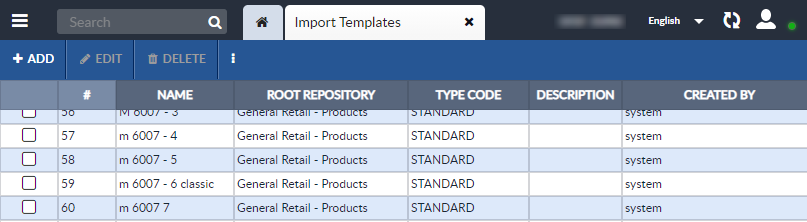
To see a list of the existing import templates, open the Import Template tab.
To do so, open the Feature Sidebar, open the Administration folder, open the Templates folder, and select Import Template. The list of import templates will be displayed in an Import Template tab.
Delete an Import Template
To delete an import template:
-
Open the Import Template tab: Open the Feature Sidebar, open the Administration folder, open the Templates folder, and select Import Template.
-
Select one or more templates you want to delete and click the Delete button on the Import Template tab's Activity Bar.
-
A confirmation window will appear that asks if you want to delete the selected template or templates. Click the Delete button. The template will be deleted.
Import an Import Template
Import templates exported by EnterWorks will be in XML format and can be imported back into EnterWorks. To import an import template:
-
Open the Import Template tab: Open the Feature Sidebar, open the Administration folder, open the Templates folder, and select Import Template.
-
Open the More
 dropdown list on the Import Template tab's
Activity Bar, and select Import.
dropdown list on the Import Template tab's
Activity Bar, and select Import.
-
The Import Template - Import window will appear. Set the configuration options as desired:
-
File Name: Select the import template file you want to import.
-
Import Template Name: The name you want the import template saved as.
-
Import Template Description: (Optional) A description of the import template.
-
-
The selected import template will imported.
Export an Import Template
Import templates exported from EnterWorks will be in XML format. To export an import template:
-
Open the Import Template tab: Open the Feature Sidebar, open the Administration folder, open the Templates folder, and select Import Template.
-
Select the template you want to export, open the More
dropdown list, and select Export.
-
The selected import template will exported.
Start an Import Job from the Import Template Tab
To start an import from the Import Template tab:
-
Open the Import Template tab: Open the Feature Sidebar, open the Administration folder, open the Templates folder, and select Import Template.
-
Select the template you want to use to import data, open the More
dropdown list, and select Start Job.
-
The Import tab will be opened. Follow the instructions given in Using EnterWorks: Imports, Exports and Syndication to finish starting the import job.

Copyright 2007, 2023 Precisely