Configure an Independent Environment
An independent EnterWorks configuration is sometimes used for QA environments. By default, EnterWorks is installed with at least three JBoss (Wildfly) processes, a Controller and two Workers. To configure an independent environment, after EnterWorks has been installed, configure it to run with only a single JBoss process. Do this on servers where the following processes are located.
Perform the following.
-
Run the following query to find the JBoss processes.
select * from B_SERVER_PROPERTY Where PROPERTY_KEY like 'JBOSS_%'
-
Verify that the query returns only a Jboss_Master process and one or more JBoss_Slave processes.
-
Run the following query to remove all of these processes.
delete from B_SERVER_PROPERTY Where PROPERTY_KEY like 'JBOSS_%'
-
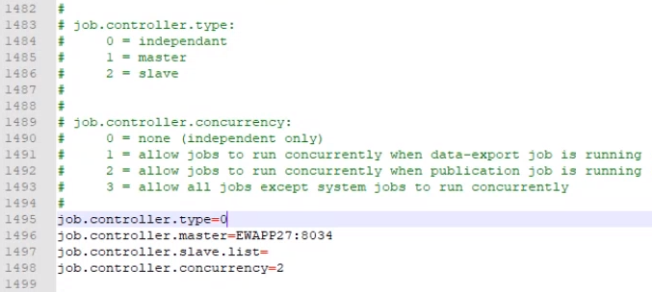
Update shared configuration properties to remove the Worker/Slave processes:
-
Change the
job.controller.typeto 0 for "independent only". -
Leave the
job.controller.master=statement as it is. -
Delete the values for the
job.controller.slave.list.
-
-
Uninstall the Worker processes. For each Worker process:
-
Open a command prompt and go to:
<drive>:\Enterworks\EnableServer\jbossWorker<n>\bin\service
-
Enter the command:
service.bat uninstall
-
-
Check the services to ensure that the
EnableServerWildflyWorker<n>services no longer appear. -
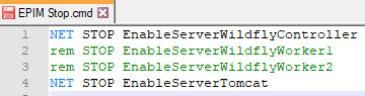
Edit the stop script for EPIM so it no longer attempts to stop the Worker processes. Edit:
<drive>:\Enterworks\bin\EPIM Stop.cmd
Comment out all the statements for Worker processes.
-
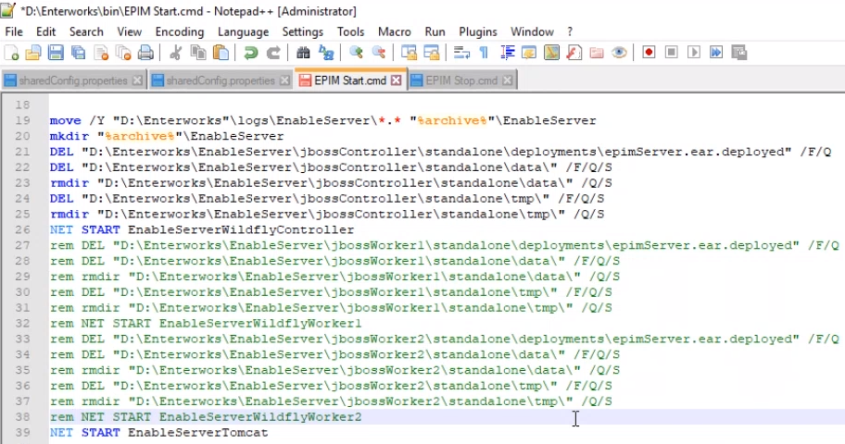
Edit the start script for EPIM so it no longer attempts to start the Worker processes. In:
<drive>:\Enterworks\bin\EPIM Start.cmd
Comment out all the statements for Worker processes.
-
Open the EPIM database in SSMS.
-
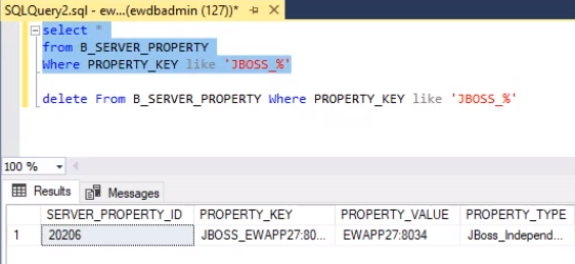
Run the following query to find the JBoss processes.
select * from B_SERVER_PROPERTY Where PROPERTY_KEY like 'JBOSS_%'
-
Verify that the query returns only a Jboss_Independent process.

Copyright 2007, 2023 Precisely