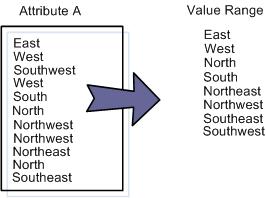
How to Find Value Ranges
A value range identifies those values which belong to a group of accepted values for an attribute. For example, a value range for the attribute Teenager would be a numeric value within the value range of 13 to 19. Value ranges can also be designated sets of values; for example, the days of the week, months, and date and time formats.
► To discover the data value range for an attribute
|
1.
|
From the Navigation View, find and expand the attribute in which you are interested. |
|
2.
|
Double-click the attribute to open a List View that shows you: |
|
■
|
How many distinct values exist. |
|
■
|
Which value is the longest and which is the shortest. |
|
■
|
The length of the minimum and maximum values. |
|
3.
|
Right-click the Values row and select Drill down to values. |
The Values List View opens.
|
4.
|
Examine the Values List View for data about value rows in which you are interested. |
|
5.
|
Right-click any value and select Drill down to matching rows. |
Data rows for that value display.
To enforce data value ranges and verify compliance for an attribute, you can enable the Range Check ABR. This ABR checks attribute values against a range that you specify; enter the range values and then specify the percentage threshold of rows or values that must pass the check.
 Related Topics