
Client cache management folder location
The EngageOne™ Interactive Editors are responsible for downloading the required files for presentation to the user in a cache location on the Windows client environment that is used to invoke the Interactive Editor. This client cache management folder location is located as shown below with the relevant log file names:
Interactive ActiveX Editor
%temp%\Low\IPE Cache\sessions\<datetime>\events.logInteractive Desktop App Editor
%temp%\IEA Cache\sessions\<datetime>\session.logwhere <datetime> is the date and time in the form of YYYYMMDDHHMMSS of the creation of the document template editor session.
The files under these Interactive Editor sessions folders will be reused as long as the session is valid. The events / session log file is a log file and not a cached file. It logs file downloads for the session. Document fragments used by Active Content and the speller dictionary files that have been downloaded once will remain and are used independently of the session. These document fragments are subject to repeat download only when changes occur to them, which EngageOne™ tracks using SRIDs. The folder structure of files subject to caching is shown in the following example:
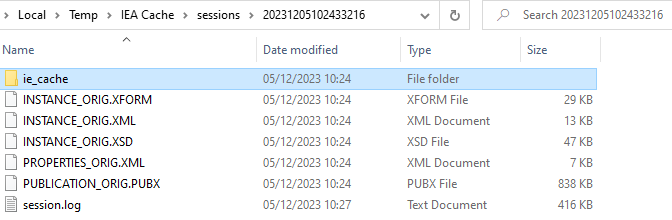
The files that are stored in the ie_cache folders are copies of the files in the Temporary Internet files folder. These files are copied here to help understand the reference created by Windows to the resource file being used for that particular session. These copy files have no real significance in relation to caching.