Configure Single Sign-on for SAML
EnterWorks can be configured to manage users through an Identity Provider (IDP) using the SAML protocol.
Due to operational requirements, port and SAML protocol usages may differ between development, test, QA, staging, and production environments.
The services for both the New UI (enable2020) and the Classic UI (webcm) need to be configured to use SSO. The process of configuring them consists of editing the scripts that create the services to set parameters for the services, editing shared configuration properties, then using the scripts to recreate the affected services.
The below table indicates the names of the EnterWorks services that must be configured for SSO using SAML, plus the names of the scripts used to perform the configuration.
| Service | Script |
|---|---|
enable-web-server-service
|
create-enable-web-server-service.cmd
|
enable-api-go-service
|
create-enable-api-go-service.cmd |
enable-webcm-broker-service
|
create-enable-webcm-broker-service.cmd
|
To configure EnterWorks for SSO using SAML:
-
 Obtain Metadata
Metadata files define how communication occurs between an Identity Provider (IDP) and a Service Provider (SP) application. Both the IDP and the SP application need to either supply metadata files, provide the URLs of the metadata files, or provide some of the content that would be in their metadata files.
EnterWorks (the Service Provider in this case) has two application endpoints that need to be configured to communicate with the IDP,
enable2020andwebcm. Both need to be configured to support SSO, therefore they both need metadata from the IDP and they both need to supply metadata.-
IDP's metadata: The customer will provide you with either the IDP's metadata files or the URLs of the IDP's metadata files. If the customer supplies the files, on the server that hosts the
enable-web-werver-service, copy the metadata files to the folder:<drive>:\Enterworks\certs\saml
-
EnterWorks metadata: The customer may or may not request metadata files for
enable2020andwebcm.-
If they do not want metadata files, supply them with the callback locations:
<hostname>/authorization-code/callback
<hostname>/authorization-code/callback/webcm
-
If they do want metadata files, generate them. Go to the indicated URL and a metadata file will be created and downloaded:
-
enable2020:
<localhost>/saml/metadata -
webcm:
<localhost>/saml/metadata/webcm
-
-
Some IDPs require that you use the information in the metadata files to configure the IDP manually. If the IDP you are using does, configure it now. For a list of IDP-specific configuration settings, see Settings for Manual Configuration of Specific IDPs.
-
EnterWorks uses the following attribute statements:
-
If
loginis not passed as an attribute,Named IDwill be used instead.If
firstnameandlastnameare both missing, EnterWorks will useloginas the user name that will be displayed in the UI. -
If SSO is being configured to manage the user's group membership as well, the following group statement must also be specified:
-
groups
-
-
-
Instructions are given below for mapping attribute statement tags that are named differently that what EnterWorks expects.
-
-
-
On all servers that host any of the following services:
enable-web-server-service
enable-api-go-service
enable-webcm-broker-service
-
The create-scripts (
create-<service-name>-service.cmd) should exist in the following folder. If they do not, create the create-scripts.<drive>:\Enterworks\enable2020\services\install\
-
Back up the create-service scripts for the affected services. Copy the following scripts:
-
create-enable-web-server-service.cmd -
create-enable-api-go-service.cmd -
create-enable-webcm-broker-service.cmd
to:
<drive>:\Backup
In order to make possible future troubleshooting easier, rename the create-service scripts in the
Backupfolder by appending the date or datetime to the end of their filenames. -
-
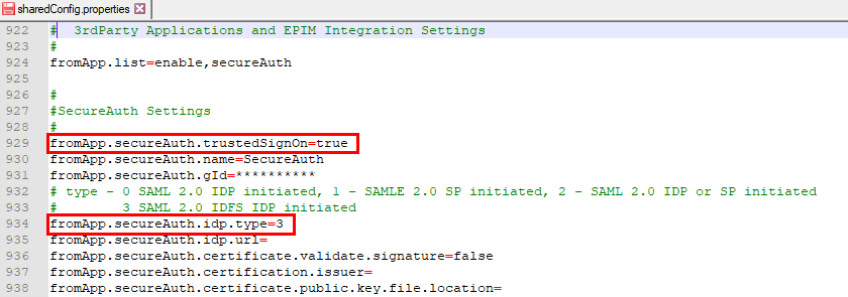
Edit the shared configuration properties:
Edit the shared configuration properties as follows:
-
fromApp.secureAuth.trustedSignOn=true -
fromApp.secureAuth.idp.type=3
-
-
Set the configuration parameters for
enable-web-server-service-
Open
create-enable-web-server-service.cmdfor editing.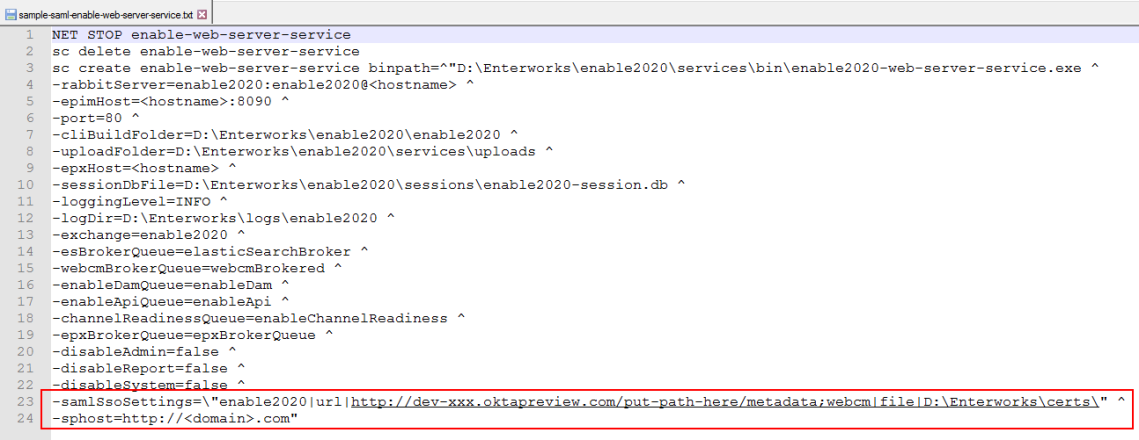
-
If the setting
-samlSsoSettingsdoesn't exist in the script, add it. -
Set the value of
-samlSsoSettingsto point to the IDP's metadata forenable2020andwebcm. The setting indicates if the locations of the metadata files are given as a file path or a URL. The metadata files do not have to both be in the same location. They also do not both have to be indicated the same way; one file's location can be stated as a file path and the other file's location can be stated as a URL.The format of the
-samlSsoSettingsstring is:-samlSsoSettings=\"enable2020|<file or url>|<location of metadata>;webcm|<file or url>|<location of metadata>\"
where:
-
<file or url> is the word "file" if <location of metadata> is a file path or the word "url" if <location of metadata> is a URL.
-
<location of metadata> is the file path or URL of the metadata file.
For example:
-samlSsoSettings=\"enable2020|url|http://dev-xxx.oktapreview.com/<...>/sso/saml/metadata;webcm|file|<drive>:\EnterWorks\certs\saml\"
-
-
If the setting
-spHostdoesn't exist in the script, add it. -
The setting
-spHostmust be set to the domain name indicated in the-webapps.baseUrlsetting in the shared configuration properties. For example, if:-webapps.baseURL=https://<domain>.com/webcm/
then set:
-sphost=https://<domain>.com
-
Save the script and exit.
-
-
Set the configuration parameters for
enable-api-go-service-
Open
create-enable-api-go-service.cmdfor editing. -
The setting
-ssoEnabledhas been deprecated. If it is present in the file, remove it. -
If the setting
-ssoIndicatordoesn't exist in the script, add it. -
Set the value of
-ssoIndicator:-
-ssoIndicator=2(Recommended setting.) EnterWorks will only request that the IDP authenticates users. When an existing EnterWorks user logs into EnterWorks, EnterWorks will confirm with the IDP that the user exists in the IDP's directory. If the user exists, EnterWorks will allow the user to log in. -
-ssoIndicator=1: (Default) Just In Time (JIT) provisioning (also known as Automatic provisioning). See Just In Time Provisioning.
-
-
Save the script and exit.
-
-
Set the configuration parameters for
enable-webcm-broker-service-
Open
create-enable-webcm-broker-service.cmdfor editing. -
The setting
-ssoEnabledhas been disabled. If it exists in the file, delete it. -
Save the script and exit.
-
-
Additional SSO Configuration Options:
-
To map attribute statements tags that are different than what EnterWorks expects:
The mapping feature allows EnterWorks to recognize attribute statement tags in the IDP's response that are different than what EnterWorks expects. To configure EnterWorks to recognize the new statement tags:
-
Create a JSON file that maps the attribute statements EnterWorks is looking for to the tags the IDP is using.
The JSON file must be named:
sso-mappings.json
and must be located in:
<drive>:\Enterworks\enable2020\services\sso-mappings\
-
The
sso-mappings.jsonfile has five key:value pairs:{ "login": "login", "firstName": "firstName", "lastName": "lastName", "email": "email", "groups": "groups" } -
The key is what EnterWorks is looking for. Replace the value with the tag the IDP is using. For instance, if the IDP is using the "
email" tag as the login value, thesso-mappings.jsonfile would have a key:value pair of"login": "email"as shown below.{ "login": "email", "firstName": "firstName", "lastName": "lastName", "email": "email", "groups": "groups" } -
The
sso-mappings.jsonfile only needs to contain key:value pairs for the attribute statement tags that are different from what EnterWorks is searching for. For example, if the IDP is using the "email" tag as the login value but the rest of the attribute statements are tagged as expected, thesso-mappings.jsonfile could only have the key:value pair for"login": "email"as shown below.{ "login": "email" } -
The
create-<service-name>-service.cmdscripts should exist in the following folder. If they do not, create the create-service scripts.<drive>:\Enterworks\enable2020\services\install
-
In the
create-enable-web-server-service.cmdfile, set thessoMappingConfigparameter to indicate the location of thesso-mapping.jsonfile:-ssoMappingConfig=<drive>:\Enterworks\enable2020\services\sso-mappings\
-
-
To configure SSO to use a token signing certificate:
EnterWorks obtains the signing certificate in the following manner:
-
EnterWorks will look for the file:
<drive>:\Enterworks\certs\token_cert.pem
If it finds the file, it will pull the certificate out of it.
-
EnterWorks will then look at the metadata. If a signing certificate is provided in the metadata, it will pull the certificate from the metadata and use it. If EnterWorks already has pulled a certificate from
token_certs.pemfile, EnterWorks will use the certificate it found in the metadata.
To configure EnterWorks to use the signing certificate, in the
create-enable-web-server-service.cmdfile:-
Uncomment out the setting:
samlSigningSPKeysPath. -
To tell EnterWorks to look for the token_cert.pem file, set the
samlSigningSPKeysPathparameter to indicate the location of thetoken_cert.pemcertificate file:-samlSigningSPKeysPath=<drive>:\Enterworks\certs\saml
-
-
-
Recreate and Register the Affected Services
Move to the directory:
<install-drive>:\Enterworks\enable2020\services\install\
and run the following scripts as an Administrator:
create-enable-web-server-service.cmd
create-enable-api-go-service.cmd
create-enable-webcm-broker-service.cmd
-
EnterWorks is now configured for SSO using SAML.

Copyright 2007, 2023 Precisely