Associate a Taxonomy with a Profile
This section only addresses taxonomies, not hierarchies. For details on registering a hierarchy with a repository, see Register a Hierarchy with a Profile.
To associate a taxonomy with a profile, edit the profile to create a taxonomy node attribute and assign that attribute to the taxonomy code set. The attribute value in a particular record will hold the taxonomy path/node for that record. For more information on taxonomies, see EnterWorks 10 Basics.
- Open the repository’s profile for editing in a Manage Profile tab, either via Open Profiles Tab or by opening the repository’s Repository Dashboard and scrolling to the Manage Profile pane.
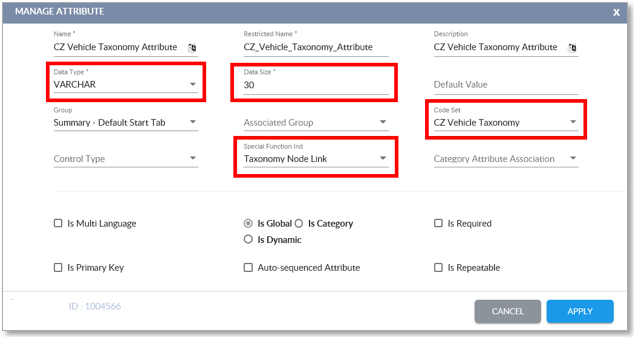
- Add an attribute, (see Add a Profile Attribute ), with these options:
- Data Type: VARCHAR
- Data Size: Must be large enough to hold your taxonomy path.
- Code Set: A taxonomy is a specialized code set. Select the name of the desired taxonomy from the Code Set dropdown.
- Special Function Indicator:Taxonomy Node Link.
- Save the attribute.
-
To assign a record its place in the taxonomy, open the repository in a
Repository View, and select the taxonomy attribute of the desired record.
An Edit window will appear.
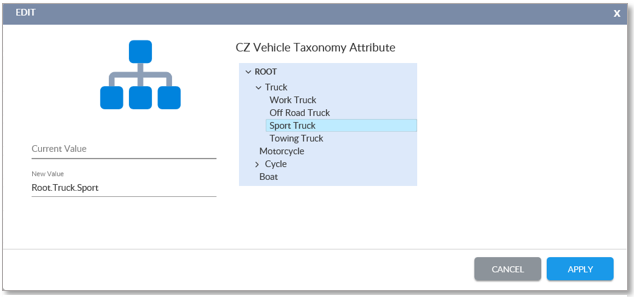
Select the Taxonomy Node
-
Use the arrow buttons to expand
 or collapse
  the taxonomy’s nodes. Select
the desired node and click the Apply button to enter the
node’s taxonomy into the record’s taxonomy attribute.
the taxonomy’s nodes. Select
the desired node and click the Apply button to enter the
node’s taxonomy into the record’s taxonomy attribute.
|
Assign Taxonomy to an Attribute |

Copyright 2007, 2023 Precisely