
<GETFILE>
As you develop Enrichment applications, you may find that specific tag groups in your control files contain the same information from one application to the next. In this case, you can use the <GETFILE> statement to call files that contain the repeated information or Input Definition File into your control file.
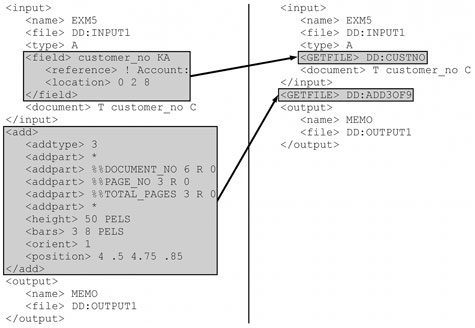
As shown in the figure below, simply place the <GETFILE> statement followed by a file specification at any appropriate point in the control file. The file specification should call a file that contains only the tag group or groups you want to use at that point in your control file. This file could be the Input group created as an Input Definition File by Visual Engineer. You can also use as many <GETFILE> statements in the control file as necessary
For example, the left-hand portion of the figure shows a fully tagged control file. Assume that the Field tag group and Add tag group are used identically in several Enrichment applications. If this is the case, it might save application development time (and troubleshooting time) to place these common structures in separate files to be called in Enrichment applications by <GETFILE> statements, as shown in the right-hand portion of the figure. The file at DD:CUSTNO contains only the Field group tagging, exactly as it would be presented in a complete control file, including comments. Likewise, the file at DD:ADD3OF9 contains only the Add group tagging.
Tag Groups
All tag groups
Standalone
Syntax
<GETFILE> filename
| Parameter | Description | Default |
|---|---|---|
| filename | The name of the file you want to include. filename may be up to 255 characters in length. | None |