
Barcode Tab
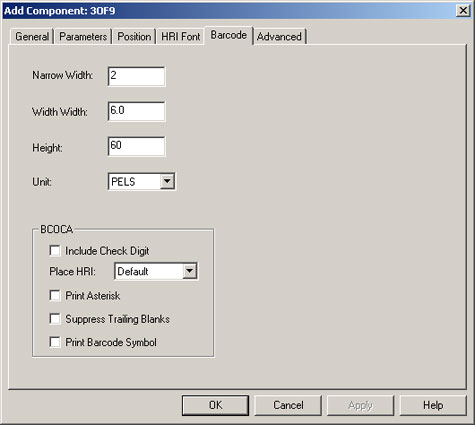
The Barcode tab allows you to specify parameters for the barcode you are adding. This tab is available if you selected to create any barcode object except ChinaPost. The fields in this window are described next.
- Narrow Width: Varies based on the type of barcode you are adding, as follows. Valid measurements for are from 1 to 20 pels or equivalent. The narrow value should not be greater than the wide value.
- For 2OF5 and 3OF9, the width of the narrowest element in the barcode.
- For 4STATE, the width of a bar.
- For OMR, the thickness of the OMR mark.
- For PLANET and POSTNET, the value can be THIN, NORMAL, or WIDE. Each of these values meets USPS® requirements for PLANET® and POSTNET™ barcodes.
- Wide Width: Varies based on the type of barcode you are adding, as follows. Valid measurements are from 2 pels to 1/4 inch or equivalent. Note: For IBM 3800 printers, the maximum value is 0.133 inches (32 pels) or the equivalent. Newer AFP printers do not have this limitation.
- For 2OF5 and 3OF9, the width of the widest element in the barcode.
- For 4STATE, the width of the gap between the bars.
- For OMR, the width of the space between OMR marks.
- Do not specify a value in this field for PLANET and POSTNET.
- Height: Sets the height of the bars in a drawn barcode when no font is used.
- For 2OF5, 3OF9, and OMR, the height of the barcode. Valid measurements are from 1/24 to 2 inches or equivalent.
- For 4STATE, the height of the tallest bar (ascender + tracker + descender).
- For PLANET and POSTNET, the value can be SHORT, NORMAL, or TALL. Each of these values meets USPS® requirements for PLANET® and POSTNET™ barcodes.
- Units: For 2OF5, 3OF9, 4STATE or OMR, select the type of units for the values in the Narrow Width and Wide Width fields. Do not specify a value for PLANET and POSTNET.
BCOCA Area
The BCOCA area contains options for using the BCOCA (Bar Code Object Content Architecture) to describe and generate 2OF5 and 3OF9 barcodes. This area is only available if you selected BCOCA as the presentation method on the General tab. The fields in this area are described next.
- Include check digit: Select this box if you want to include a check digit at the end of barcodes. If an odd number of characters is specified for the barcode, EngageOne™ Enrichment adds a checksum digit to the last character in the barcode. This checksum prints with the human-readable interpretation (HRI). EngageOne™ Enrichment calculates the original sum as follows:
sum = (each odd-position digit) x 3 + (each even-position digit)The checksum is a number that, when added to sum of the digits, creates a multiple of 10. For example, if the barcode value is 23456, the checksum is calculated this way:
(2 x 3) + (4 x 3) + (6 x 3) + 3 + 5 = 44The checksum digit would be 6 (44 + 6 = 50, a multiple of 10). The HRI for the resultant barcode would be 234566.
When adding 2OF5 and 3OF9 barcodes, the checksum calculation is controlled by the Include Check Digit check box on the Barcode tab and is handled by the printer, not by EngageOne™ Enrichment.
- Place HRI: Specifies where the HRI is to be printed. Choose one of the following:
- Default: Prints HRI at default location.
- Above: Prints HRI above symbol.
- Below: Prints HRI below symbol.
- No: Does not print HRI.
- Print Asterisk: Specifies whether or not the HRI should include the asterisk on both ends for 3OF9.
- Suppress Trailing Blanks: Specifies whether to remove trailing blanks from the value used to generate the barcode.
- Print Barcode Symbol: Prevents the barcode from being printed. If you select this box and also select the Use HRI check box on the Position tab, only the HRI will print.