
Position Tab
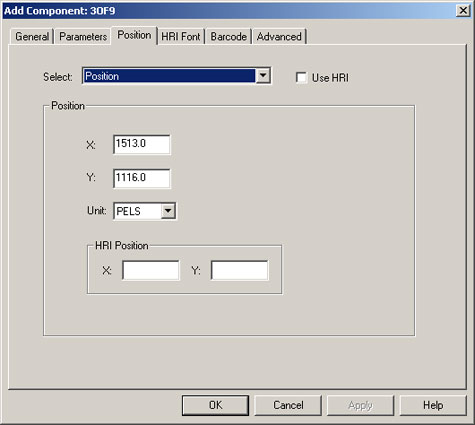
The Position tab allows you to specify the horizontal and vertical displacement of the added object from the origin point on the physical page. The fields on this tab are described next:
- Select: Allows you to select whether this position is for a single-up or multiple-up print stream.
- Position: This position is for a single-up print stream.
- Positions for Multiple Up: This position is for a multiple-up print stream.
- Use HRI: Check this box to include the text equivalent of the barcode (human readable information).
- X: The horizontal distance from the origin point to the top left corner of the barcode, OMR mark, overlay, or page segment or to the baseline of the added text. The distance can be from 0 to 24000 pels (or the equivalent).
- Y: The vertical distance from the origin point to the top left corner of the barcode, OMR mark, overlay, or page segment or to the baseline of the added text. The distance can be from 0 to 24000 pels (or the equivalent).
- Unit: The type of units in which you specified X and Y.
- HRI Position: Specifies the position of the HRI text to be included with the barcode. This is required if you select the Use HRI check box.
- X: The horizontal distance from the origin point to the baseline of the 2OF5 or 3OF9 barcode’s HRI. The distance can be from 0 to 24000 pels (or the equivalent). This parameter is only valid with 2OF5 or 3OF9.
- Y: The vertical distance from the origin point to the baseline of the 2OF5 or 3OF9 barcode’s HRI. The distance can be from 0 to 24000 pels (or the equivalent). This parameter is only valid with 2OF5 or 3OF9.