
Manage a Record’s State
The Manage Record State functionality allows the user to manage several different record state indicators for one or more records. The choice of state indicators included in this functionality and their available values are configurable by the system administrator.
To modify the state of one or more records:
- Open the desired repository in a Repository View. Open the Feature Sidebar, select the desired folder, and select the desired repository. The repository will be opened in a Repository View.
- Select the record or records whose state is to be edited.
- Open the More Actions dropdown list by clicking the
More button
 on the Repository View’s Activity Bar and click the
Manage State button.
on the Repository View’s Activity Bar and click the
Manage State button. 
- The Manage Record State window will appear.
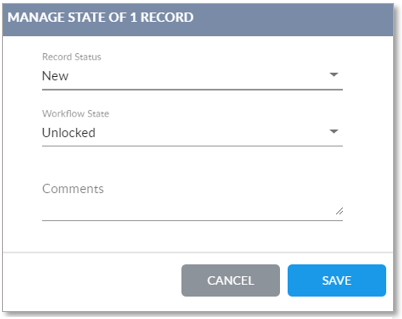
- The Manage Record State window displays status indicators for
the record. The choice of status indicators and their values are
configurable by the system administrator.
-
Record Status: Indicates if the record is in sync with the Production record. Possible values include:
-
New: The record is new.
-
Sync: The record is in sync.
-
Change: The record has been changed but not re-synced.
-
Delist
-
-
Workflow State: If locked, the record is associated with a work item that is in a workflow.
-
- After setting the record state as desired, click Save to save the new state(s) and exit the window. Select Cancel to exit the window without saving the state(s).