
Repository Audit History
The Repository Audit History shows the modifications that were made to a repository. From the Audit History tab, you can:
View a Repository's Audit History
To open the Audit History tab:
- Open the desired repository in a Repository View. Open the Feature Sidebar, select the desired folder, and select the desired repository. The repository will be opened in a Repository View.
- Open the Audit History tab by clicking the More icon
 on the Repository View’s Activity Bar, and selecting
Audit History.
on the Repository View’s Activity Bar, and selecting
Audit History. 
- The Audit History tab will appear.
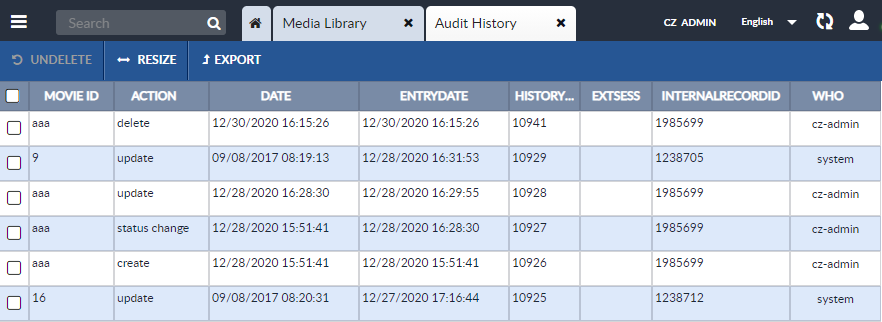
Export a Repository's Audit History
To export a repository's Audit History:
- Open the desired repository in a Repository View. Open the Feature Sidebar, select the desired folder, and select the desired repository. The repository will be opened in a Repository View.
- Open the Audit History tab by clicking the More icon on the Repository View’s Activity Bar, and selecting
Audit History.
- The Audit History tab will appear.
- Select the audit records you would like to export and click the Export button on the Audit History's Activity Bar.
- A dropdown list will appear that allows you to select the format of
the exported Audit History.
-
CSV
-
XLS
-
XLSX
-
- Select the desired format and where you would like the exported file to be stored.